If you’ve been searching for the best free Elementor news theme, you already know the problem: most free news themes slap an “Elementor compatible” badge on their product page and call it a day. Real compatibility — where Elementor actually controls your headers, footers, post layouts, and every section in between — is rare, especially in the free tier.Newsmatic by BlazeThemes is the exception. It is, without question, the best free Elementor news theme available on WordPress.org right now — and this post will show you exactly why, feature by feature.
What Makes a Truly “Elementor-Ready” News Theme?
Before diving into Newsmatic, it’s worth defining what genuine Elementor compatibility actually means for a news theme. Most WordPress themes can display Elementor-built page content. That’s the bare minimum.
A truly Elementor-ready news theme goes further:
- Full theme builder support — build headers, footers, and archive pages inside Elementor
- News-specific Elementor widgets — grids, carousels, tickers, banners, filter tabs
- Works with Elementor Free — not locked behind Elementor Pro
- Consistent styling — Elementor styling doesn’t clash with theme CSS
- Dedicated widget library — not just generic content blocks, but purpose-built news layouts
Newsmatic checks every single one of above lists — for free.
Newsmatic: The Best Free Elementor News Theme on WordPress.org
Newsmatic: The Best Free Elementor News Theme on WordPress.org
Newsmatic is a free WordPress news theme built by BlazeThemes and available directly from theofficial WordPress.org theme directory.
It currently has:
- 10,000+ active installations
- 4.8 out of 5 stars on WordPress.org (from 78+ reviews)
- 27+ one-click demo imports
- Regular updates — last updated March 2026
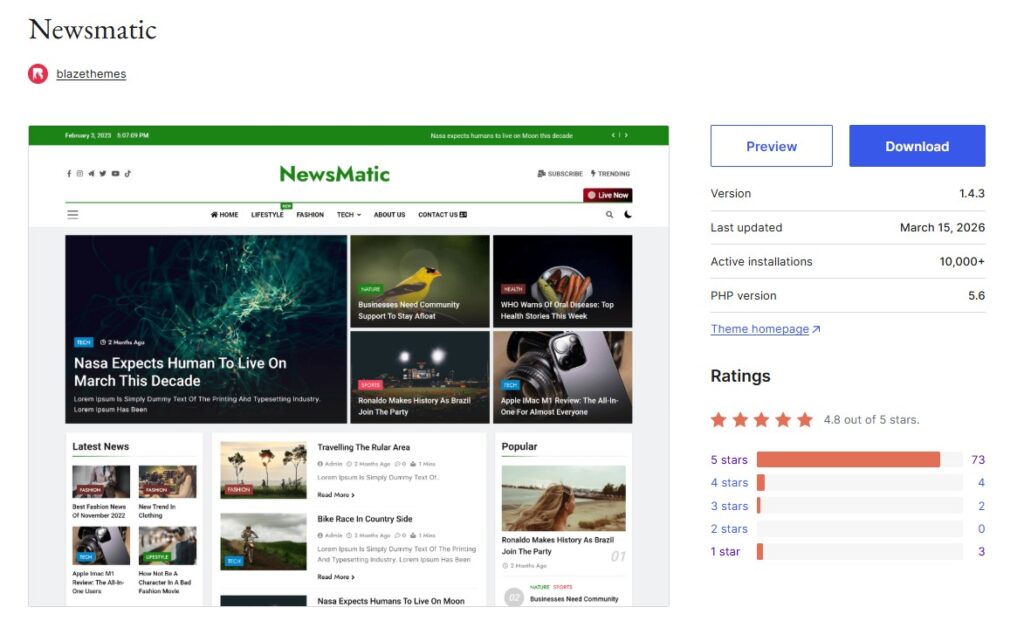
It’s fast, lightweight, schema-ready, GDPR-compliant, and built specifically for news and magazine websites. But its biggest advantage over every other free news theme is its deep, native integration with Elementor through the companion News Kit Addons for Elementor plugin.
News Kit Addons for Elementor: The Plugin That Makes Newsmatic Unstoppable
The free News Kit Addons for Elementor plugin by BlazeThemes is what transforms Newsmatic from a great news theme into the best free Elementor news theme on the market.With 57 purpose-built Elementor widgets and a full Theme Builder, this plugin gives you complete visual control over your entire news website — without needing Elementor Pro or any paid tools.
Generic Widgets (Site Infrastructure)
These widgets handle the structural elements of your news site:
- Site Logo & Title — display your branding in the header
- Site Nav Menu — standard and mega menu navigation
- Live Search — real-time search results without page reload
- Date & Time — real-time clock and date display
- Dark/Light Mode Toggle — one-click theme switching for readers
- Random News — shows a different post on every page load
- Advanced Heading — animated, styled headings with transitions
- Canvas Menu — slide-out template in a popover overlay
- Back To Top — smooth scroll to top button
- Tags Cloud — styled tag display
- Phone Call & Mailbox — click-to-call and mailto shortcuts
- Live Now Button — custom call-to-action button
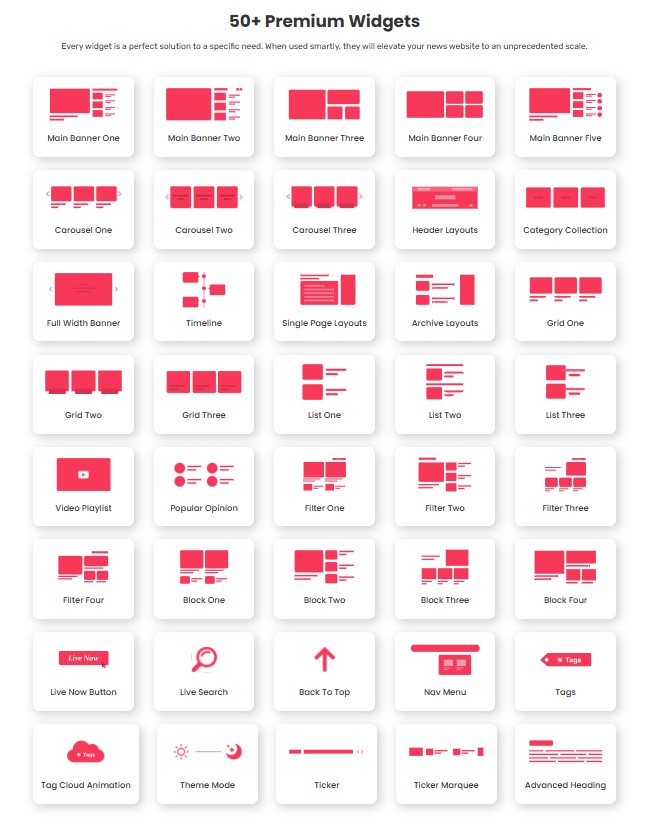
Layout Widgets (News Content Blocks)
This is where Newsmatic truly separates itself. These 40+ widgets are built specifically for displaying news content:
Ticker & Banners
- Ticker News Marquee — scrolling breaking news headline strip
- Full Width Banner / Slider — hero-style post slider
- 5 Main Banner layout variations (stacked grid, featured + list, magazine-style, and more)
News Grids & Lists
- 3 News Grid layouts — standard, masonry-style, compact
- 3 News List layouts — vertical list, thumbnail list, minimal list
- News Block layouts 1–4 — featured post with trailing secondary posts alongside
News Carousels
- 3 News Carousel layouts — horizontal swipe carousels for any section
News Filters (Category Tabs)
- 4 News Filter layouts — display posts by category with clickable filter tabs, no page reload
Other Layout Widgets
- Popular Opinions — highlight editorial or opinion content
- Category Collection — display categories as a grid or carousel
- News Timeline — chronological display for events or historical coverage
Every one of these widgets is fully customizable inside Elementor’s panel — typography, colors, spacing, post count, category filtering, excerpt length, image size, and more.
Free Theme Builder — No Elementor Pro Needed
One of the most impressive features in the News Kit Addons plugin is the built-in Theme Builder, included completely free.
Navigate to Dashboard → News Kit → Theme Builder and you can visually build:
- Custom headers (with any combination of logo, menu, search, dark mode toggle, ticker, and more)
- Custom footers
- Single post templates
- Archive page templates
This is functionality that normally requires Elementor Pro — a paid upgrade starting at $59/year. With Newsmatic and News Kit Addons, you get it at zero cost, and it’s tightly integrated with the theme to ensure flawless rendering.
27+ One-Click Demo Imports
Getting started with Newsmatic is as fast as it gets. The theme ships with 27+ professionally designed pre-built demo websites covering a wide range of news niches:
- General news portals
- Technology and gadget news
- Sports coverage sites
- Local news websites
- Lifestyle and magazine layouts
- Pet care websites (yes, really — niche content wins)
Each demo imports in one click using the BlazeThemes Demo Importer plugin, giving you a complete, fully designed site with sample content — ready to replace with your own stories. No blank-slate anxiety, no hours of layout work.
Why Newsmatic Beats Every Other Free Elementor News Theme
Let’s be direct. Here’s why no other free news theme comes close on the Elementor front:
Most free news themes give you Elementor page editor compatibility — you can build pages with Elementor, but the header, footer, sidebars, and archive layouts remain controlled by the theme, not by you.
Newsmatic + News Kit Addons gives you Elementor control over literally every part of your site — from the top of the header to the bottom of the footer, including archive templates, single post layouts, and widget areas — all for free.Additionally, the 57 news-specific Elementor widgets are built for news publishers, not generic website builders. You get news tickers, category filter tabs, carousels, and multi-column news blocks that other free themes simply don’t offer inside Elementor.
Other Key Features of Newsmatic
Beyond the Elementor integration, Newsmatic is a full-featured news theme:
Performance & SEO
- Schema markup built in — helps Google understand your content structure
- Lazy image loading — defers off-screen images to speed up page loads
- React-based Customizer controls with AJAX live preview
- Lightweight codebase, optimized for Core Web Vitals
Design Flexibility
- React Color Picker in the Customizer — full palette control
- Advanced Typography Fields — font family, size, weight, style, line height per element
- Custom header element reordering — drag and rearrange header components
- Full-width and boxed layout options
- RTL language support
Publisher Tools
- Advertisement blocks — banner and sidebar ad zones built in
- Multilingual ready — tested with WPML
- Newsletter integration — connect popular email plugins out of the box
- Random News feature for increasing page depth
- Sticky post support
Compliance
- GDPR compliant — collects zero personal data
- 100% GPL licensed
How to Set Up Newsmatic with Elementor (Step by Step)
Getting your Elementor-powered news site live takes less than 10 minutes:
- Install Newsmatic → WordPress Dashboard → Appearance → Themes → Add New → search “Newsmatic” → Install → Activate
- Install Elementor (free) → Plugins → Add New → search “Elementor” → Install → Activate
- Install News Kit Addons for Elementor → Plugins → Add New → search “News Kit Addons for Elementor” → Install → Activate
- Import a demo → Dashboard → News Kit → Demo Import → pick your layout → one-click import
- Open Elementor → edit any page → find “News Elementor Widgets” in the widget panel → drag and drop
Your Elementor-powered news site is ready. Start replacing demo content with your own stories.
Newsmatic Free vs. Newsmatic Pro
The free version of Newsmatic is genuinely production-ready. You are not getting a stripped demo. That said, Newsmatic Pro adds:
- Additional pre-built demo layouts (30+ total in Pro)
- Extra news block and banner variations
- Breaking news ticker options
- Premium support with faster response
- Automatic theme updates
When you upgrade, all your existing free version settings, content, and customizations carry over seamlessly. The Pro version only adds to what you’ve built — nothing is replaced or lost.
Real User Reviews
Newsmatic holds a 4.8/5 star rating on WordPress.org from 78+ verified reviews, with 73 five-star ratings. Users consistently highlight:
- The quality and variety of pre-built demos
- How much customization the free version actually offers
- Responsive support from the BlazeThemes team
- The seamless Elementor integration since News Kit Addons launched
Frequently Asked Questions
Does Newsmatic work with Elementor Free (not Pro)? Yes. Newsmatic and the News Kit Addons plugin both work entirely with the free version of Elementor. Elementor Pro is not required for any of the features described in this post.
Can I use the Theme Builder without Elementor Pro? Yes. The Theme Builder inside News Kit Addons is free and independent of Elementor Pro. You can build custom headers, footers, and post templates entirely through the free plugin.
How many Elementor widgets does Newsmatic add? Through the News Kit Addons for Elementor plugin, Newsmatic adds 57 purpose-built Elementor widgets focused on news and magazine layouts.
Is Newsmatic good for Google News? Yes. Its schema markup, clean HTML structure, fast loading speed, and mobile-responsive design all align with Google News indexing requirements.Is Newsmatic really free? Yes. The theme is available for free on WordPress.org and the News Kit Addons plugin is also free on WordPress.org. A Pro version with additional features is available, but the free version is fully functional for a professional news site.
Final Verdict
If you are looking for the best free Elementor news theme in 2025, the search ends with Newsmatic.
No other free WordPress news theme gives you:
- 57 news-specific Elementor widgets
- Free Theme Builder (header, footer, archive, single post)
- 27+ one-click demo imports
- Schema-ready, fast, GDPR-compliant foundation
- Works entirely with Elementor Free
- 20,000+ active installs and a 4.8-star rating
It is the gold standard for free Elementor news themes — and it keeps getting better with every update.
Download Newsmatic + News Kit Addons
- Newsmatic Theme (Free): wordpress.org/themes/newsmatic
- News Kit Addons for Elementor (Free): wordpress.org/plugins/news-kit-elementor-addons
- All Demos & Features: blazethemes.com/theme/newsmatic-free
- Newsmatic Pro: blazethemes.com/theme/newsmatic-pro
Have you built your news site with Newsmatic and Elementor? Drop your experience in the comments — we’d love to see what you’ve created.
Contact us at support@blazethemes.com for any guide you need to setup your Website.